I recently presented at Canopy Live on building communities online. This is a session I trimmed down from a full day's training that Dr Lou Mycroft and myself offer colleges and schools ( happily discuss more about this with anyone interested, anytime).
“Students said they were more likely to engage when they felt that staff valued them, were reliable and consistent in their engagement with online work, and had set up effective support measures.”
I purposefully include this from 2017 as I think anything pre pandemic is interesting. Not that what we learnt in the pandemic isn't interesting, but I like to highlight that online teaching happened pre pandemic and we learnt a LOT from that time too.
I don't think this quote is telling us anything unusual. Students want to feel valued. We all do. That is the practice of care (if you ever spend time with Dr Mycroft you will hear her speak to this often) that is education. How do we show students we care? What conditions for them to excel do we create? When teaching online how do we check in?
Also at Canopy Live was the wonderful Cat Lamin. She shared about how important it is to check in on others and your own mental health. She used this duck scale to ask us how we were.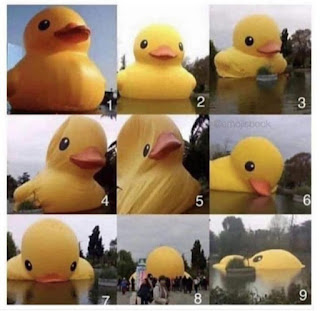 What I like about the duck scale is that it is open to all, everyone can relate to the stages. This is one type of check in, there are others. What is important though is that we check in. I tweet regularly that the algorithms on social media show you what it thinks you want to see. To build community you have to go beyond the algorithm. Seek out people to connect with, topics that interest you. Scrolling isn't the way to build community on social media. Active dialogue is. Engaging with others, seeking voices different to yours to learn from. We rely a lot on platforms to deliver what we need. Think about a VLE. It shows you what you want to see, who has done the work and when. What it doesn't show you (instantly, agree that this is possible with back channels and extra interventions) is how the work went for students? How did they feel? Was it appropriately challenging? That's the human conversational part that we need to add in as an extra to our work. Likewise on Twitter, it delivers the information it is required to deliver. Scrolling until your hearts content, but the human interaction and connection is the work that you have to do.
If you are serious about building communities online, you might want to consider checking in, with a duck or without. The feeling of value you will show another in doing so cannot be underestimated.
If you are serious about building communities online, you might want to consider checking in, with a duck or without. The feeling of value you will show another in doing so cannot be underestimated.
Once you have checked in, how do you let students know that you value them throughout the lesson? I am reminded of a colleague who was once upset that a student failed to acknowledge her lovingly crafted feedback on each page of a students work. The student wanted to know the grade and what to do to improve in summary and disregarded hours of teacher feedback. Had the teacher asked what feedback the student had wanted there would have been a different outcome. Think yellow box marking where one section of yellow boxed work is marked intently. I have seen this include students self selecting the section to be marked also. The student has owned their work and indicated that they only require this section to be marked. The teacher marks that section with the level of feedback the student has asked for. Recognising whole college and school policies often dictate how we mark, but I think there are elements in this that can work and I have seen work well.
Teaching online, we can replicate this by indicating the yellow box. But that verbal feedback as we would traditionally circulate the room are slightly trickier. Sure we can verbally offer feedback, perhaps not whole class and maybe in breakout rooms? My go to technique is to use comments in student work live. I take a helicopter view of one slide deck. Each slide has the task, space for student work and each student's name on top. I then share one doc with the class with edit rights. Version history helps reinforce my expectations of etiquette and respect for others work in the doc. Each student navigates to their slide in the deck and works. I can see the colour code for each student as they work. I can then add comments live.

I can toggle my view to grid view (slide sorter view in PowerPoint) and see everyone working at once. I can see work appear live and dive in to slides where I think students might need help. Students feel safe to contribute, we have established expectations and I have reminded them of version history. Students feel valued that I can give them feedback quietly and as I would if I were circulating the room. Students could see each others work in the room normally, online they can too. If this were an issue for my students I would maybe move this quick, instant verbal feedback I am replicating online to Google Chat or private comments to students. I am showing students that I value their work and I am supporting them in their learning. We are all connected and building a learning community online.
Referring back to the initial quote, the value students perceive is also in expectations and support. Backchannel chats are a supportive measure my students enjoy. Our backchannel is via Google Chat. Students can privately message me live with how they are feeling, issues, ideas and I can support. Something like Backchannel Chat is also appropriate. That immediate support of knowing that your teacher is there and will be able to help is an effective support in itself, just the knowing. My students mainly share emojis at the level of challenge they are experiencing and my job is to support them to overcome that fear or work through it to achieve their potential in that class. This is time consuming and mentally taxing for me as a teacher, but since when was teaching not either of those things? We do what we need to do to help our students. I find setting a self marking activity for the class useful whilst I manage the back channel at key points in the lesson invaluable. Otherwise students would be left looking at my thinking face whilst I manage all the communication modes.